A database, two services and an address, in five commands
A walk through an ordinary deploy — the Dockerfile, the five commands, what the engine says back, and the one command it refuses.
Everything below is one project, built from an ordinary repository with no gagarin-specific anything in it. No manifest, no config file, no YAML: there is nowhere on this platform to put one, which is the point and is also why this post is short.
The app is a Go API, a web front end that calls it, and a Postgres under both.
Call the project feed.
1. The Dockerfile is the only file we need
If your repository already builds an image, you are done before you start. Ours is the usual two-stage build:
FROM golang:1.25-alpine AS build
WORKDIR /src
COPY go.mod go.sum ./
RUN go mod download
COPY . .
RUN CGO_ENABLED=0 go build -o /out/feed ./cmd/feed

FROM gcr.io/distroless/static:nonroot
COPY --from=build /out/feed /feed
EXPOSE 8080
USER nonroot
ENTRYPOINT ["/feed"]
Two things about it matter here and nothing else does. It listens on one TCP port, and it reads its configuration from the environment. That is the entire contract — anything that satisfies it runs here.
2. The project, and the database under it
gg init feed
gg resource add feed/pg postgres
gg init creates the project everything else is named for. gg resource add
provisions the Postgres and, more to the point, keeps the credentials. Nobody
types a password into anything after this, and no connection string goes near a
repository.
3. Ship it
gg ship builds the current directory, pushes the image and deploys it — three
commands' worth of work, and they are still there separately for the day you want
them apart.
gg ship feed/api:8080 --deps pg
gg ship feed/web:3000 --deps api
The number after the colon is the port the container listens on, and --deps is
the whole of the configuration: it says what this service may reach, and the
platform hands it the connection variables of any resource in that list. The
database password is never typed and never committed.
Note what is not in those commands. No replica count, no rollout strategy, no health-check path, no ingress class, no namespace, no service account, no NetworkPolicy. All of those exist underneath — this is Kubernetes down there — and none of them is a decision worth making at this point in the afternoon.
4. Nothing reaches anything it has not declared
This is the part people are usually surprised by, and it is the part worth reading twice.
A private service is default-denied. Until the edge is declared, the call is dropped — and a dropped packet hangs, it does not fail fast.
--deps declared them on the way past. The graph also moves on its own, without
a deploy:
gg deps ls  feed/api
gg deps add feed/api pg
gg deps rm  feed/api pg
Adding an edge is yours. Taking one away asks a human to approve it, because it is the one change that breaks something and reports nothing: the service keeps running, the status stays green, and the call simply stops arriving.
The graph is not a picture drawn from variable references after the fact. The graph is the firewall.
A migration is not a service
A job runs to completion and listens on nothing. Same image, run once, reaching the database the same way:
gg run feed/migrate feed:2026-09-01 --deps pg
gg run waits, prints what the job wrote, and exits with the job's own exit
code — so CI can branch on it as though it had run the migration itself.
5. An address
gg domain add feed/web feed.example.com
Certificate and ingress come with it. Leave the domain off and the service gets a
generated one on apps.gagarin.cloud instead.
A resource cannot have an address. Ask anyway, and the engine says so rather than doing something clever:
{
  "error": {
    "code": "not_a_service",
    "message": "pg is a postgres resource, not a service",
    "fix_hint": "a resource is reached from inside the project by name and is never public"
  }
}
Every error carries a stable code and a fix_hint. Branch on the code, never
on the prose — the error contract is the whole list.
What it looks like once it is up
$ gg status feed
project feed  (id eqteoeay)

    SERVICE  KIND      SIZE  READY  PORT  REACHES  IMAGE               VOLUME
  ● api      service   s     1/1    4000  pg       api:1788569515      —
  ● pg       postgres  s     1/1    5432  —        postgres:17-alpine  10GB /var/lib/postgresql/data
  ● web      service   s     1/1    8080  api      web:1788569576      —
    └ https://feed.gagarin.cloud
    └ https://web-eqteoeay.apps.gagarin.cloud

  ● running
  $0.789 today so far
One screen: what runs, what it reaches, what it costs today. The REACHES
column is the firewall, printed.
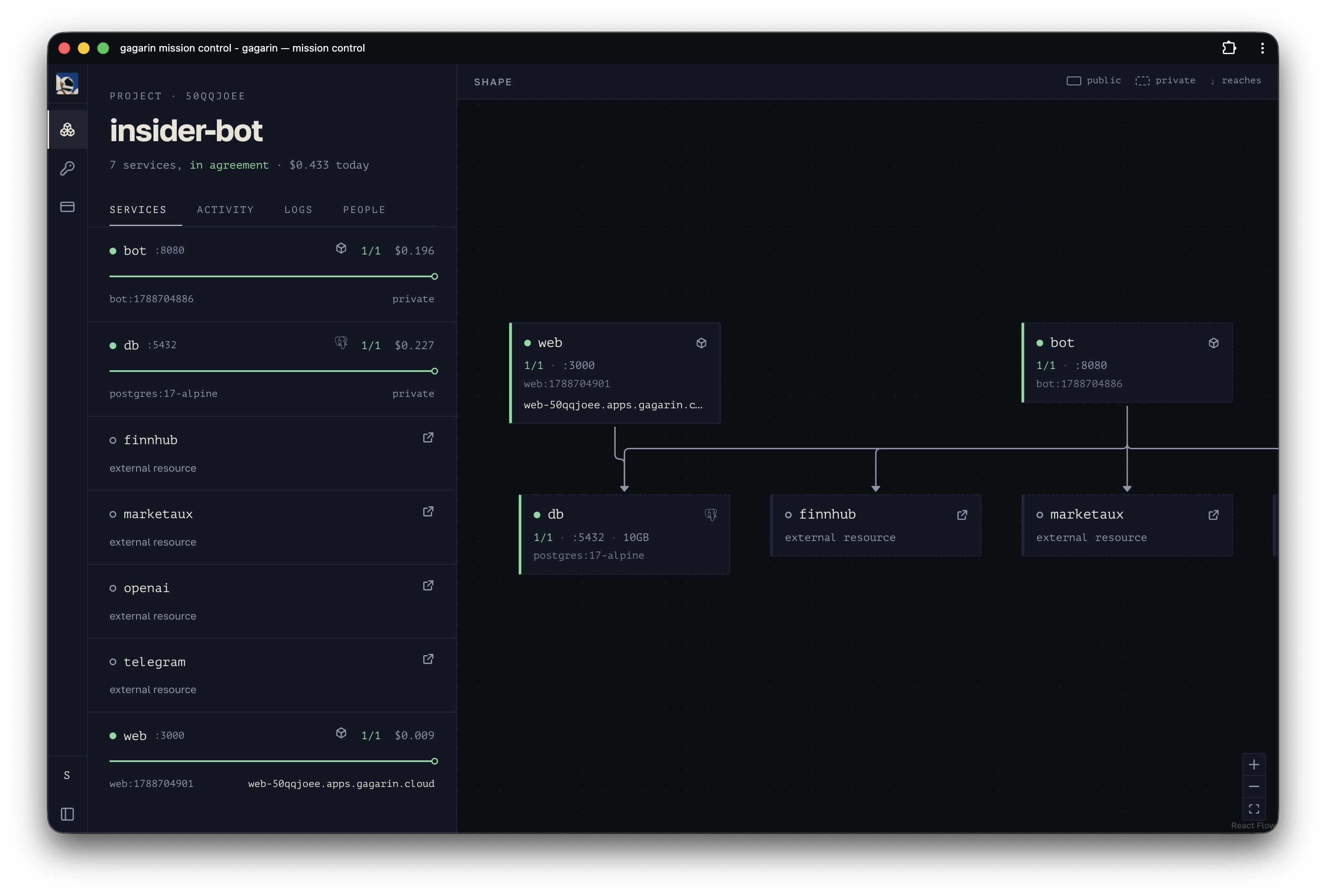
A different project in the console — the same reading, drawn. There is nothing to press that is not also a command: one source of truth, and a second way to change it is exactly what we are not building.
And the command it will not run
The database has a service depending on it now. Ask for it to be destroyed and
the answer is no — not a confirmation prompt, not a --force, just no:
gg destroy feed/pg → 409 service_in_use, naming what holds it, and the hint is the command that would let go first. Same graph as step 4, read from the other end.
The whole afternoon:
| step | command | what it is |
|---|---|---|
| 1 | — | your Dockerfile, unchanged |
| 2 | gg init + gg resource add | a project, and a Postgres |
| 3 | gg ship ×2 | two services, and the edges between them |
| 4 | gg deps | the graph, when it moves without a deploy |
| 5 | gg domain add | the address |
Five commands, and the only decision in them was which service gets a port.
If you want to follow along with your own repository, gg login prints a link
and a code, and there is $5 on a new account to spend. If you want to
know what happens the day you want out, we wrote that down too:
leaving.